
Looking for a Quizlet alternative? What to look for
Looking for a Quizlet alternative? Here's what to actually check: grounded-in-your-notes content, the study modes you need, and zero busywork.
Looking for a Quizlet alternative? The short version: don't pick by brand, pick by what the tool does with your own notes. The best alternative is the one that turns your actual study material into the formats you'll really use, with the least busywork.
Here's the thing. Most people switch tools for one of three reasons: they're tired of typing out flashcards by hand, they want more than just cards, or they want study material that matches their class instead of a random deck someone else made.
So the question isn't "what's the best Quizlet alternative." It's "what fits how I study." Let's break down what actually matters.
A good Quizlet alternative starts with where the content comes from
This is the first thing to check, and most people skip it.
Some tools are built around decks other students made and shared. That's fine for a popular intro course. It falls apart fast when your professor has their own slides, their own emphasis, and their own exam style.
A grounded-in-your-notes tool flips that. You give it your PDF, your lecture notes, your slides, and the study set comes from that. No drift, no "this card is about a topic we never covered."
When you're comparing options, ask:
- Does it build from my own files (PDFs, notes, slides), or from a shared library?
- Is the content limited to exactly what I upload, or does it pull from the open web?
- Can I keep one subject's material together in its own space?
That last point matters more than it sounds. If you study three subjects, you want three clean piles, not one giant mush. Here's a simple way to keep things sorted: organize your study notes by notebook so each exam has its own home.
Look at how much typing it asks of you
Be honest about the part that always kills momentum: making the cards.
Hand-typing flashcards feels productive, but it's mostly transcription. You're copying, not learning. And it's the step you quietly stop doing in week three.
So a real Quizlet alternative should cut that work way down. The bar to look for:
- You drop in a file and a deck appears, instead of typing each card.
- It pulls the key terms and ideas for you, so you just review and tweak.
- Setup takes about a minute, not an hour.
If you're sick of the manual grind, that's a legitimate reason to switch. Here are your alternatives to making flashcards by hand, and a closer look at flashcards that build themselves from your notes.
Check what study modes you actually get
Flashcards are great. But flashcards alone aren't a study system.
The research on this is solid: you remember more when you make yourself retrieve answers, not just re-read them. That's the testing effect (Roediger and Karpicke, 2006). The more ways you can quiz yourself, the better it sticks.
So look for variety, not just cards:
- Flashcards for quick term-and-concept review.
- A quiz so you practice recalling under a little pressure.
- A mock exam for a realistic dry run before the real one.
- Audio (a podcast or read-aloud) for review when your eyes are busy.
A tool that only does cards makes you do everything else somewhere else. One tool, a few modes, same notes. That saves you the juggling.
If you want to understand why testing beats re-reading, this breaks it down: the testing effect, and why quizzing yourself works. And if you want to actually quiz before exam day, here's how to quiz yourself before the exam does.
Don't forget the boring-but-important stuff
The flashy features get the attention. These are the ones you feel every day:
- Phone-first. Most studying happens in gaps: the bus, the line, ten minutes before class. If it's not easy on mobile, you won't open it.
- Background and offline-ish review. Can you review without staring at a screen? Audio modes help here.
- Speed of setup. If it takes longer to make the set than to study it, you'll bail.
- Free to start. You shouldn't have to pay before you know it fits.
One mode people overlook: turning notes into audio. Review hands-free on a walk or commute. If that's your gap time, look at listening to your notes on the go.
A quick way to compare your options
You don't need a spreadsheet. Just score each tool on what matters to you.
| What to check | Why it matters | Good sign |
|---|---|---|
| Where content comes from | Matches your class, not a stranger's deck | Builds from your own PDFs and notes |
| Manual work | Busywork is what you quit | Drop a file, get a set in about a minute |
| Study modes | Variety helps you retrieve, not just read | Cards, quiz, mock exam, audio |
| Mobile + free start | You study in gaps, on your phone | Free on iOS and Android |
The "right" answer changes per person. A pre-med with dense PDFs wants grounded content and a mock exam. A language learner wants cards plus audio. Score it for your situation. Not a review article's.
Where Kyonote fits
Quick, honest note since you're here: Kyonote is one of these tools, and it's built around the grounded-in-your-notes idea.
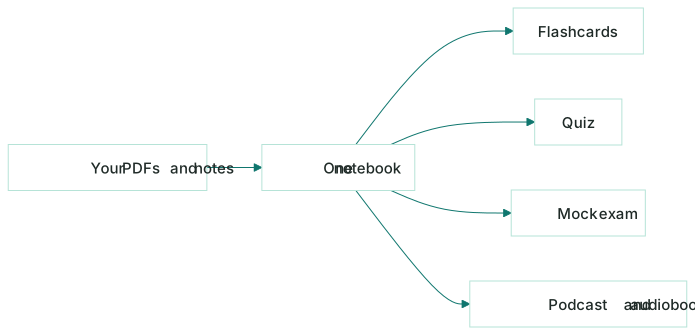
You make a notebook for a subject or exam. You drop in PDFs, paste lecture notes, or add your own slides. From that one notebook, it builds five things, all from your files:
- An AI podcast: a two-host conversation that explains your material (free episodes up to 10 minutes, Pro up to 30).
- An audiobook read-aloud you can just listen to.
- Flashcards you flip and mark "Got it" or "Again".
- A quiz at three levels: gentle, mixed, hard.
- A mock exam for a full dry run.
It's free to start on iOS and Android, with an optional Pro plan. It won't fit everyone, and that's fine. The point is to pick by your habits.
If you want to see how one set of notes becomes several study formats, here's one notebook, three ways to study.
The bottom line
Don't shop for a "Quizlet alternative" by name. Shop by fit.
- Pick a tool that builds from your own notes, not random decks.
- Pick one that cuts the typing so you actually keep using it.
- Pick one with a few study modes, so you can test yourself, not just re-read.
- Try the free tier first, and check current plans before you pay.
Whatever you land on, the win is the same: less time making study material, more time recalling it. That's the part that moves your grade.
Frequently asked questions
- What should I look for in a Quizlet alternative?
- Pick the tool by what it does with your own material. The big ones: does it pull from your notes and PDFs instead of random internet decks, how little manual typing it asks of you, and whether it gives you more than flashcards (quizzes, audio, a mock exam) so you can actually test yourself.
- Is there a free Quizlet alternative?
- Yes, several tools have free tiers, and the right one depends on how you study. Kyonote is free to start on iOS and Android: you drop in a PDF or paste your notes and it builds flashcards, a quiz, and a two-host podcast grounded in your files. Always check the current free limits before you commit, since plans change.
- What is the difference between Quizlet and Kyonote?
- Quizlet centers on flashcards and study sets you can search or build. Kyonote starts from your own files: you make a notebook, add your PDFs or notes, and it generates flashcards, a quiz, a mock exam, plus an AI podcast and audiobook, all grounded in exactly what you're studying. They fit different habits, so try both.