
How to make a study podcast from your notes (3 ways)
How to make a study podcast from your notes, three ways: record yourself, use text-to-speech, or use an AI tool. The steps, the pros, and the catches.
To make a study podcast from your notes, you've got three real routes: record yourself reading them, run them through text-to-speech, or hand them to an AI tool that writes and voices the whole thing. This post walks through the actual steps for each, plus the catch with every option.
Quick map before we start:
- Record yourself. Most personal, takes the most time.
- Text-to-speech. Fastest, but flat and literal.
- AI tool. Least effort, and the audio is built to be heard.
Let's do them in order.
Way 1: Record yourself reading your notes
The lowest-tech option, and an underrated one. Reading your notes out loud forces you to slow down and actually process them, which is half the value before you ever press play.
Here's how to make a study podcast this way:
- Pick one topic or chapter. Don't try to record everything at once.
- Clean up your notes into a rough script. Cut headings and half-sentences so you're not reading fragments.
- Open your phone's voice memo app. That's all the gear you need.
- Find a quiet room without echo. Carpet and curtains help more than a mic does.
- Read it through. Talk like you're explaining it to a friend, not reading a textbook.
- Save it to your audio app and listen on your next walk.
When it's worth it:
- You think better out loud, or you like teaching the material to yourself.
- You want a recording in your own words and your own voice.
- You only have a few pages to cover.
The catch:
- It's slow. A full chapter can take a long time to read cleanly.
- You'll fumble and restart, and you'll probably hate how you sound.
- You can't skip the boring parts later, because you recorded them too.
If reading aloud appeals to you, lean in. Explaining things in plain words is one of the oldest study moves there is. It's basically the Feynman technique with a record button.
Way 2: Run your notes through text-to-speech
Paste your notes into a text-to-speech app and it reads them back in a synthetic voice. Seconds of effort, hands-free audio out the other end.
The steps:
- Copy your notes, or export your PDF's text.
- Paste it into a text-to-speech tool or your phone's built-in read-aloud feature.
- Pick a voice and a speaking speed you can stand.
- Generate the audio and save or queue it.
The upside is speed. You get something to listen to almost instantly. Play it while you do other things.
The catch is that plain text-to-speech reads everything. Your headings, your typos, your half-finished bullet points, the formatting noise. It doesn't know what matters, so it just narrates the page top to bottom.
It works fine when:
- Your notes are already clean and written in full sentences.
- You only want to hear the words, not have them explained.
- You're reviewing something you already mostly know.
Honestly, this is closer to an audiobook than a podcast. If a clean read-aloud of your notes is what you actually want, that's a real and useful thing. More on listening to your notes on the go.
Way 3: Use an AI tool to write and voice it
This is the newest route and, for most people, the least work. You give the tool your material, and it figures out what's important, writes a script, and renders the audio.
How to make a study podcast this way:
- Make a notebook or project for the subject.
- Drop in your PDF, paste your lecture notes, or add your slides.
- Let the tool generate the episode.
- Open it in the player and listen. Speed up, skip, replay the bits you missed.
The good tools don't just read your notes back. They explain them: a back-and-forth conversation, questions and answers, recaps. The kind of thing that holds your attention on a walk instead of turning into background noise.
What to check before you trust one:
- Where does the script come from? You want it grounded in your file, not pulled from the open web. Otherwise you're studying for the wrong test.
- Can it take your real notes? PDFs, pasted text, slides. Not just a one-line topic prompt.
- Is it a conversation or a monologue? One flat voice is a lecture. A two-host back-and-forth is far easier to follow.
- How long are the episodes? Long enough to cover a chapter, short enough to actually finish.
If you want the longer comparison of all three routes and how to choose, there's a breakdown of the best way to turn notes into a podcast too.
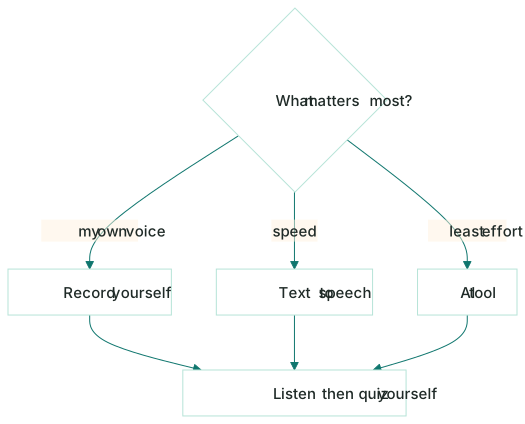
The fastest way to make a study podcast (quick comparison)
| Route | Effort | Best for |
|---|---|---|
| Record yourself | High | Your own voice, thinking out loud, a few pages |
| Text-to-speech | Low | A fast, plain read of clean notes |
| AI tool | Lowest | Notes that get explained, not just read |
The AI route is the only one where you don't trade a chunk of time for the audio, which is why it's the easy default. But if you genuinely think better out loud, recording yourself doubles as a study session on its own.
Don't let the podcast do all the work
One honest warning, whichever route you pick: a podcast is a great first pass and a great review, but listening is passive. It's easy to let it play while your attention quietly drifts.
The fix is to pair it with something active. Listen to the episode, then test yourself on the same material with self-building flashcards or a quick practice quiz. The audio gets it into your head; pulling it back out is what makes it stick.
Where Kyonote fits
Kyonote is the AI option, with one rule it doesn't break: everything stays grounded in your files.
You make a notebook, drop in a PDF or paste your notes, and Kyonote writes a two-host conversation that explains your material. It plays like a normal audio player (speed, skip, background play, and a transcript that follows along word by word). Free episodes run up to 10 minutes, Pro up to 30.
The part people miss: it's the same notebook that also makes those flashcards and that quiz. So the podcast isn't a one-off. It's one of several ways into the same material, the one-notebook idea in practice.
Pick the route that fits your time. Want the audio without the effort, grounded in exactly what you're being tested on? Drop a file into Kyonote and hear what your notes sound like.
Frequently asked questions
- How do I turn my notes into a podcast?
- There are three routes. Record yourself reading your notes into a voice memo app, paste your notes into a text-to-speech tool, or drop your file into an AI study tool that writes a script and voices it for you. The AI route is the least work; recording yourself is the most personal.
- Do I need recording gear to make a study podcast?
- No. Your phone's voice memo app is enough for recording yourself, and text-to-speech or AI tools need no gear at all. A study podcast is for your own ears, so quiet beats fancy. Just find a room without echo and you're set.
- Is listening to a study podcast actually effective?
- It's great for a first pass and for review when you can't sit and read, like on a commute. But listening is passive, so it works best paired with active recall like flashcards or a quiz. Make the audio, then test yourself on the same material.