
The best way to turn your notes into a podcast
The best way to turn your notes into a podcast depends on your goal. Three honest options — record yourself, text-to-speech, AI tools — and how to pick.
The best way to turn your notes into a podcast depends on what you want out of it: something personal in your own voice, something fast, or something that does the writing for you.
There are really three options. None is "best" for everyone. Here's the honest version of each, and how to pick.
Your three real options
The short version:
- Record yourself. Most personal, slowest.
- Plain text-to-speech. Fastest, but flat.
- AI study tools. Least effort, and the audio is built to be listened to.
Let's go through them.
Option 1: Record yourself reading your notes
You open your voice memo app, read your notes out loud, and you've got audio.
This is the most underrated option, honestly. Reading your notes aloud forces you to slow down and actually process them. That's half the value. You also get your own voice, your own emphasis, your own asides.
When it's worth it:
- You learn well by teaching or explaining out loud.
- You want a recording in your own words.
- You only have a few pages to cover.
The catch:
- It's slow. A chapter can take a long time to read cleanly.
- You'll fumble, restart, and probably hate how you sound.
- There's no easy way to skip the boring parts. You recorded them too.
If reading aloud appeals to you, that instinct is sound. Explaining things in plain words is one of the oldest study tricks there is, and it works.
Option 2: Plain text-to-speech
Paste your notes into a text-to-speech tool and it reads them in a synthetic voice. Fast, free-ish, zero effort.
The upside is obvious: you get audio in seconds, and you can listen hands-free while you do other things.
But plain text-to-speech has one real weakness. It reads everything. Your headings, your half-finished sentences, the filler, the formatting. It doesn't know what matters. It's a narrator, not a study partner.
It works fine when:
- Your notes are already clean and well-written.
- You just want to hear the words, not have them explained.
- You're reviewing something you already know.
This is closer to an audiobook than a podcast. If that's actually what you want, a clean read-aloud of your notes with the text highlighting as it plays, Kyonote does that too. More on listening to your notes on the go if that's your goal.
Option 3: AI tools that write and voice it for you
This is the newest option, and for most people it's the lowest effort. You give the tool your material, and it figures out what's important, writes a script, and renders the audio.
The good ones don't just read your notes. They explain them. A two-host conversation, questions and answers, recaps. The kind of thing that actually holds your attention on a walk.
What to check before you pick one:
- Where does the script come from? You want it grounded in your file, not pulled from the open web. Otherwise you're studying for the wrong test.
- Can it take your actual notes? PDFs, pasted text, slides. Not just a topic prompt.
- How long are the episodes? Long enough to cover a chapter, short enough to finish.
- One voice or two? A single voice is a lecture. A back-and-forth is easier to follow.
For a deeper walk-through of the AI route, see how to make a study podcast from your notes.
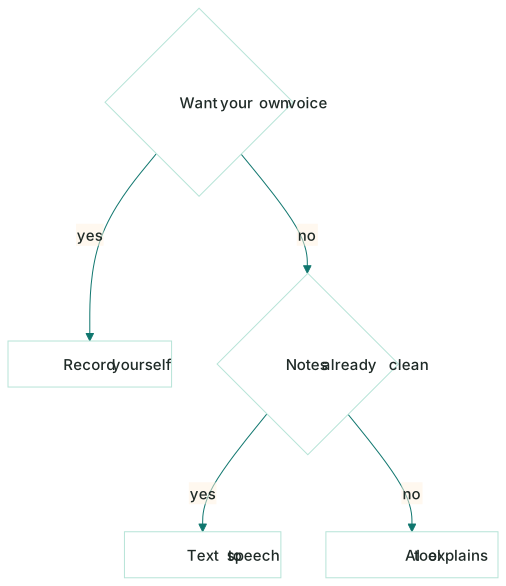
How to pick
Quick way to decide:
| If you want... | Go with |
|---|---|
| Audio in your own voice, and you have time | Record yourself |
| A fast, plain read of clean notes | Text-to-speech / audiobook |
| Least effort, and notes that get explained, not just read | An AI tool |
The AI route is the only one where you don't trade a lot of time for the audio, which is why it's the easy default for most people. But if you genuinely think better out loud, recording yourself is a real study session on its own.
Don't let "podcast" become an excuse to never sit down with the material. Audio is a great first pass and a great review, but it's easy to let it play while your attention drifts. If you catch yourself zoning out, that's the signal to switch to something active for a bit, then come back to the audio later.
Where Kyonote fits
Kyonote is the AI option, with one rule it doesn't break: everything stays grounded in your files.
You make a notebook, drop in a PDF or paste your notes, and Kyonote writes a two-host conversation that explains your material. Then it plays like a normal audio player, with speed, skip, background play, and a transcript that follows along word by word. Free episodes run up to 10 minutes, Pro up to 30.
The part people miss: it's the same notebook that also makes your self-building flashcards and a practice quiz before the exam does. So the podcast isn't a one-off. It's one of several ways into the same material.
That matters because podcasts are great for getting a topic into your head, but listening is passive. The flashcards and quiz are where you pull it back out, which is what makes it stick. Same source, different angles. That's the one-notebook, three-ways idea in practice.
So: pick the option that fits your time and how you study. If you want the audio without the effort, grounded in exactly what you're being tested on, drop a file into Kyonote and hear what your notes sound like.
Frequently asked questions
- What's the easiest way to turn notes into a podcast?
- An AI study tool is usually the least work. You drop in a PDF or paste your notes, and it writes a script and renders the audio for you. Recording yourself is more personal but slower; plain text-to-speech is fast but reads everything flatly, including the filler.
- Can I make a study podcast from a PDF?
- Yes. Most AI tools, including Kyonote, take a text-based PDF directly. Kyonote turns it into a short two-host conversation grounded in that file. Scanned image-only PDFs with no readable text won't work, since there's nothing to read.
- Is a podcast actually a good way to study?
- For some things, yes. Audio is great for a first pass on a topic and for review when you can't sit and read, like on a commute. But listening alone is passive, so pair it with active recall like flashcards or a quiz to make it stick.